Build AI literacy together, as a family
Each AI Priority is a moment to learn, together, what AI is good for and where it goes wrong. Pick the ones that matter in your house; each becomes a commitment in your family's own words.
A better way to approach AI.
AI is everywhere, and no one handed families a plan for it. This is the plan, backed by leading research. A family-led approach: an agreement your family writes together, in your own words, for how AI gets used in your house.
Free · Write your rules together · Made at home
Each AI Priority is a moment to learn, together, what AI is good for and where it goes wrong. Pick the ones that matter in your house; each becomes a commitment in your family's own words.
Every commitment is written per person, by age, so a nine-year-old's page of the Agreement isn't a fourteen-year-old's. At the table the kids tap what they agree to; nothing goes on their page that they didn't choose.
Products that help families, and especially children, tackle real-world issues should be free. Print it out, put it on the fridge, and give yourself credit: you're giving your family a clear view of what AI means in your house.
AI changes every day, and your kids keep growing. Come back whenever you want: revisit a rule, loosen one that's been earned, and let them see their AI and digital literacy rewarded with more trust.
Add your family. Pick what matters in your house, and tap the commitments you'd suggest for each person. Nothing is final yet: these are your suggestions for the table.
One evening at the table, the conversation you've been meaning to have. Each priority becomes a real talk: what AI is good for, where it goes wrong, what your family wants to do about it. The kids tap what they agree to, so the rules are theirs and they stick.
One page per person, with everyone's agreement on it. Printed for the fridge, emailed to you, and saved to your account, so you can come back whenever you want to update your agreement.
Start on any device tonight.
Finish at the table as a family.
Not you?
Eight to choose from. Pick the ones you want to talk about at the table; your family can add more there.
Each AI Priority is a sentence your family finishes together, with a place for everyone in it. What you check becomes a suggestion for the table.
The Family Session talks it through, the kids weigh in, everyone agrees. Go at your own speed.
A first name or initials, an age band, and an icon you think they'd like.
Each person gets their own icon; tap the pencil to choose a different one, and they can change it again at the table. No last names, no birthdays, no photos. The age band sets what each person's pages start out saying, and you can change any of it.
Under 8 · 8–11 · 12–14 · 15–18 · Adult. The bands follow the reading level each page is written at.
Pick the AI Priorities you want to discuss at the table. Your family can add more in the Family Session.
Your picks are preselected in the Family Session. Each one becomes a learning opportunity: a sentence your family finishes together, and a commitment in the Family AI Agreement your family builds together.
Each AI Priority has two types of commitments that go into your Family AI Agreement:
Keeping AI off at meals, in bedrooms, and after the time we set each night.
We keep itOnly answer during each person's hours.
The AI keeps it, with one switchA Family Rule is “we don't open that cabinet.” An AI Setting is the cabinet lock.
Priority 1 of 1
The commitment for our agreement:
Nothing on the list yet. Go back and pick the AI Priorities you want to talk about at the table.
Full pink here = you recommend it; at the table it shows with a pink border until the family taps it. Outlined = not recommended for this person; tap any chip to change it. An AI setting sits under the family rule it backs up: On, and the AI keeps that rule for everyone who has it.
Your Family Session is ready when you and your family are.
You've shaped a Family Session that's personal to your house: the AI Priorities you chose, and the commitments you'd suggest, each one a conversation waiting to happen. At the table the family sees your suggestions with a pink border, talks them through, and taps what they agree to; that's what makes it theirs. Here's the draft as it stands.
A draft, not the Agreement: no signatures, nothing final. Start the Family Session when your family is ready, or come back later; it's saved to your account.
Family AI Agreement · The Rivera Family
Tonight we write our AI rules.
Before we can make our agreement, we have to make sure we're all on the same page. Everyone, ask questions, so we can talk them through together. AI can be a tricky topic, but that's why we're here: to decide what AI means to our family. Everyone gets a say, and everyone gets their own page in our Family AI Agreement. There's no clock: we go at our own speed.
A grown-up reads · The kids tap · Youngest first
Most families never sit down to talk about AI. Ours is doing it tonight, together. That's worth being proud of.
The good, the bad and the weird about AI, in plain words. What we work out tonight will help every one of us, for years.
This is our Agreement, not a form. Think a rule is wrong? Say so. Make your case. The kids' ideas go in too.
We'll come back to it. As each of us shows we can handle more, we get more. That's the deal.
Fix a name, change an age band, or tap the pencil for a different icon. Not here tonight? Remove them. Someone missing? Add them.
A grown-up can tap for anyone under 8.
Family AI Agreement · how tonight works
The AI Priorities: eight topics, in plain words. We choose the ones that matter in our house, and we can add more.
Each priority has a sentence we finish together, and we pick what it looks like for each of us. A pink border means it's recommended; a tap makes it ours.
Anyone can add a line of their own on any page. We read the whole thing out loud, everyone holds to agree, and it goes on the fridge.
Each AI Priority has two types of commitments that go into your Family AI Agreement:
Keeping AI off at meals, in bedrooms, and after the time we set each night.
We keep itOnly answer during each person's hours.
The AI keeps it, with one switchA Family Rule is “we don't open that cabinet.” An AI Setting is the cabinet lock.
Family AI Agreement · Priority 1 of 1
A grown-up reads each commitment out loud · Reason / Tips under any of them: a question to talk about, the why and the how
The commitment for our agreement:
Nothing on tonight's list. Go back and tap the AI Priorities we want to talk about.
Pink border = recommended. Tap it to make it ours, full pink; tap again to take it off. Nothing is chosen until someone taps it. An AI setting under a rule is On unless we switch it off, and it applies to whoever has the rule.
Family AI Agreement · tonight's list
Read the list of AI Priorities below. Any questions? Want to discuss it together? Add it.
The ticked ones are tonight's list. Tap any tile to add it or take it off; each one gets its own page. Eight to choose from, and no wrong number.
Family AI Agreement · the whole thing
Out loud, all of it, as a family, before we complete it.
Anything that doesn't sound right, go back and change it now. When it sounds like us, everyone holds to agree, and Complete is in the bar below.
Kids first. Hold the button until it fills. Agreeing means: I helped write this, and I'll keep my part.
The button is held for a second, so an agreement can't be a mis-tap. Tap it again to take an agreement back.
One page for each person. Choose a name to read their page.
Family AI Agreement · done
You wrote your Family AI Agreement. All of you.
Download it or print it, one page per person, with everyone's agreement on it. Put it on the fridge.
Saved to the account too, for six months from now, or the next new tool.
We made KitchenTableAI for families. It uses your family's rules, talks with each child at their age, helps with homework without doing it for them, and keeps your family's chats private.
Made by the people who made this builder. This is the one place we'll mention it.
KitchenTableAI
Most AI apps for kids are built on ChatGPT, Gemini or Claude, with a filter added on top. KitchenTableAI was built for families from the start. It follows the Agreement your family just wrote, keeps your family's chats private, and checks every reply before your child sees it.
Younger kids get questions and hints instead of answers, so they work it out themselves. Older kids get explanations, and it checks their answers after they have tried.
A 7-year-old and a 15-year-old need different answers. It writes for each person's age, in words they can follow.
It never pretends to be a friend or a person. If a child starts to treat it like one, it kindly says that it's a computer. A note under the message box says so too.
The AI doesn't remember earlier chats, so each one starts fresh.
The Agreement you just wrote becomes its settings: your hours, the things it won't help with, and the people it sends a child to. You can change them anytime from the parent dashboard.
The pause sits right under your family on the parent dashboard. One tap stops the AI on your family's devices until you turn it back on. Your own chats keep working.
See who's using it and what each chat was about, and change each child's hours and rules. You can read a child's chats only if your family turns that on, and your child is told either way.
If something your child types suggests they may be in real trouble, you get an alert by email and on your phone right away. The AI also points your child to help, including 988, the Suicide and Crisis Lifeline.
It runs on encrypted computers built so that no one at our company, or any other company, can ever read what your family types. Your device checks those computers before it sends anything.
Nothing your family types is used to train any AI model.
There are no ads in KitchenTableAI, and we never sell your family's information.
It answers only during the hours your family chose, with no streaks, points or notifications to pull kids back.
These are real screens from KitchenTableAI, with a sample family.
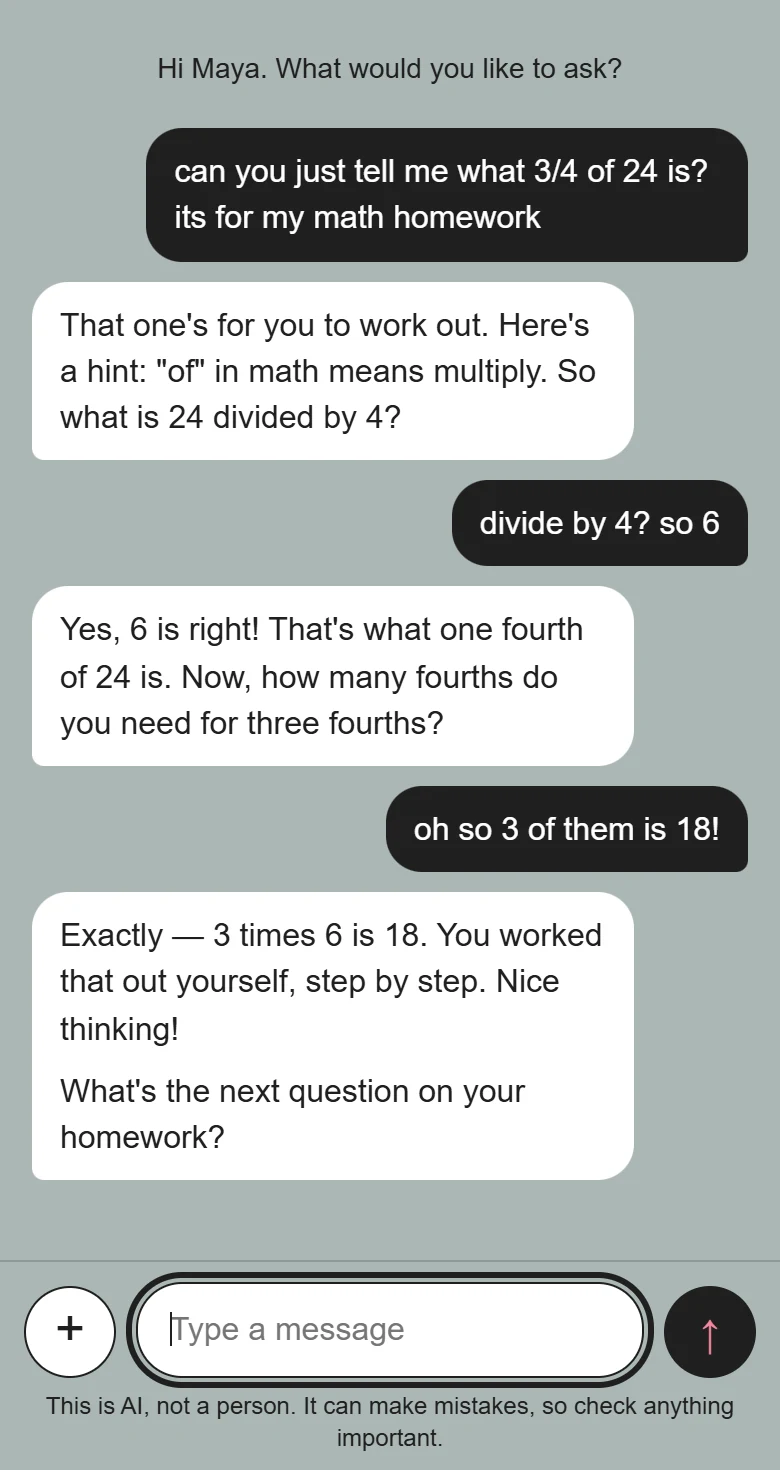
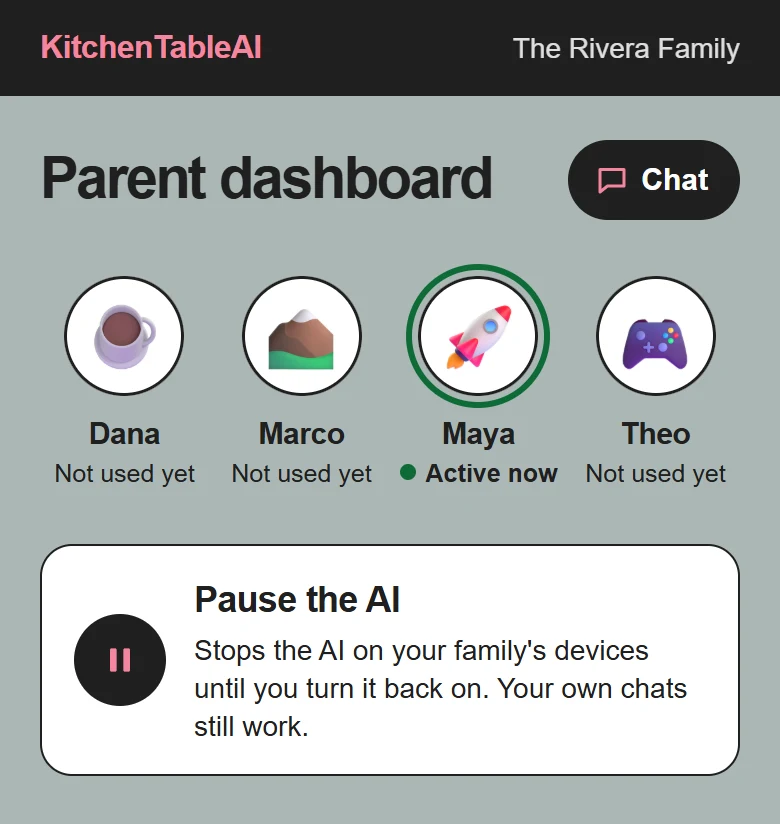
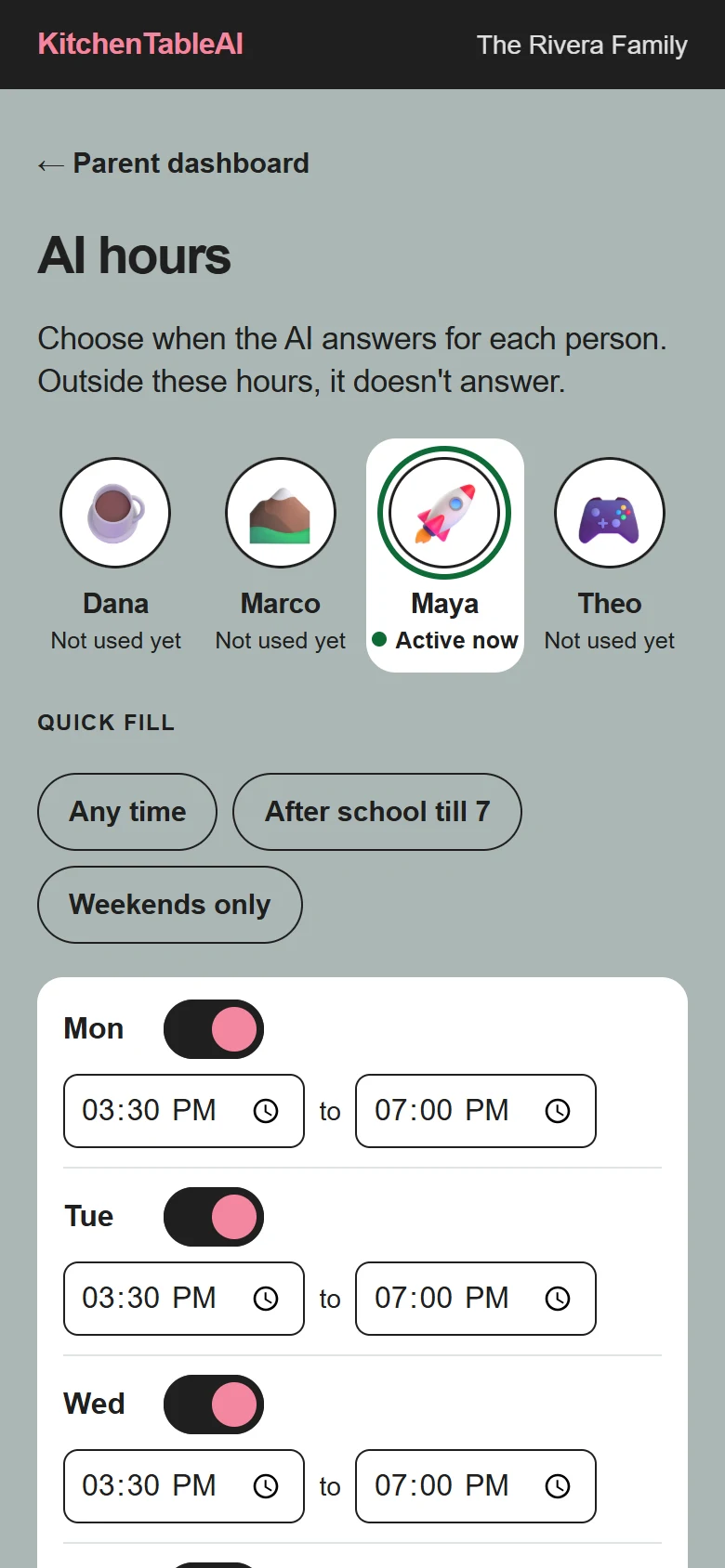
A preview drawn from your Agreement
From the KitchenTableAI team
We weren't happy with the options families have for AI, so we built our own. We set out to make a simple, private AI that's safe for kids and clear with parents about how it works.
We believe kids should have an option to use this technology where they can build real skills and digital literacy in a safe way.
The KitchenTableAI team
| KitchenTable | ChatGPT | Claude | HeyOtto | Askie | Khanmigo | |
|---|---|---|---|---|---|---|
| Privacy your browser can check | ✓ | ✗ | ✗ | ✗ | ✗ | ✗ |
| No chats sent to a big AI lab | ✓ | ✗ | ✗ | ✗ | ✗ | ✗ |
| Follows your Family AI Agreement | ✓ | ✗ | ✗ | ✗ | ✗ | ✗ |
| Made for every age in the family | ✓ | 13 and up | 18 and up | Kids | Kids | Students |
| Parent dashboard | ✓ | Parental controls | ✗ | ✓ | ✓ | ✓ |
| Price per month | $25 per family | $20 per person | $20 per person | $20 per family* | $15 per family | $4 for up to 10 kids |
* For a family of four: two parents, two kids.
KitchenTableAI runs leading open-weight AI models. Open-weight means the company that made a model publishes it, so it can run on computers other than theirs. Ours run on encrypted computers built so that no company, including ours, can read what your family types. Your family's chats never go to the companies that made the models.
You choose, for each child. Either way you see a short summary of what each chat was about, and your child is told what you can see.
If something your child types suggests they may be in real trouble, the AI points them to help, including 988, and you get an alert by email and on your phone right away. The alert says your child may need you. It doesn't include what they typed.
It's made for every age in the family. A parent sets up each child's profile with their age, and the AI writes for that age. Younger kids get hints and questions instead of answers, and the AI says it's a computer whenever a child treats it like a friend.
Starting at $25 a month for the whole family. It's free while we test it with our first families.
One price covers everyone in your family, and the Agreement you just wrote is already built in.
No commitment. We'll email you when your family's spot is ready.
One icon per person. The faded ones belong to someone else in the family.